Google tag audit and checks · Chrome side panel

Every button, link and trigger, tagged. Then proven.

Tagmin scans the page you're on and lists every button, link and trigger event that needs tag management. Tag it in Google Tag Manager, preview what fires, publish, and watch it land in GA4.
Free for FaaStr users. Built FaaStr: a by-product of the Flow process.
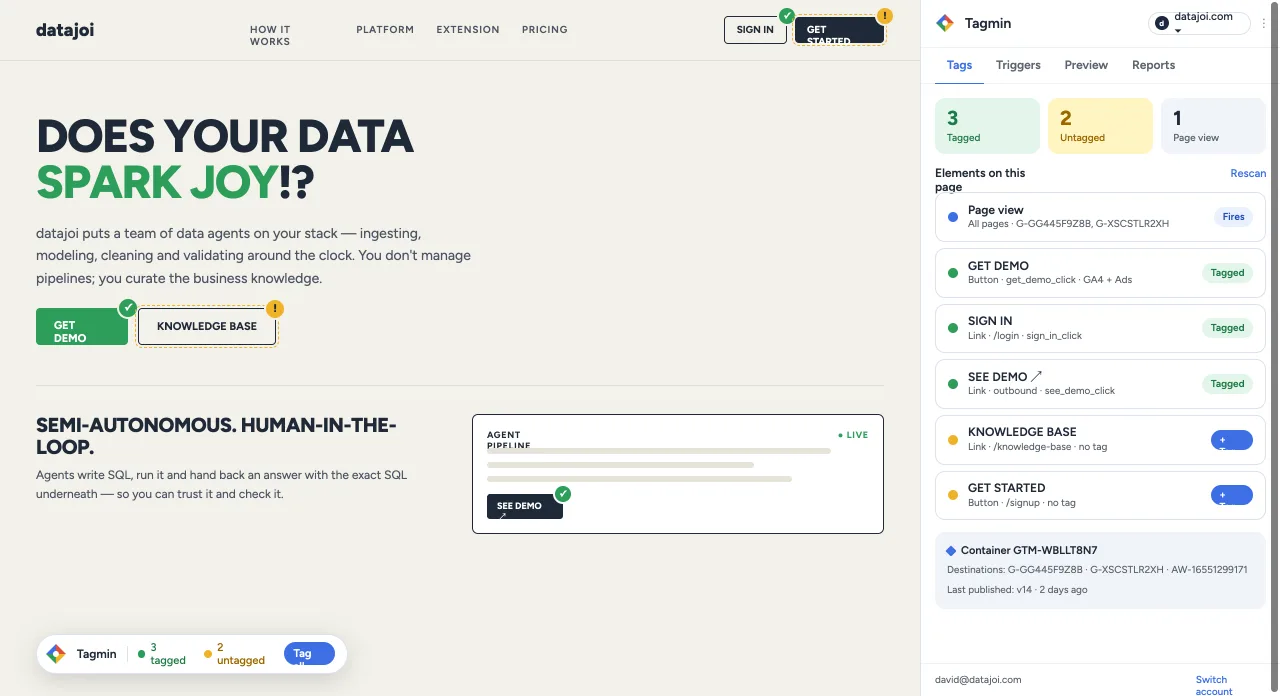
Tagmin side panel open on datajoi.com. Three elements are tagged and two are untagged. Page view, Get demo and Sign in are tagged; Knowledge base and Get started have no tag yet. The container shows its Google Tag Manager ID and the destinations it sends to.
Tagged elements get a green check on the page. Untagged ones get a warning, and one click starts the tag.

Prerequisites once per domain. Then the loop.

Everything after the Tag Manager hub repeats for every new or edited tag.
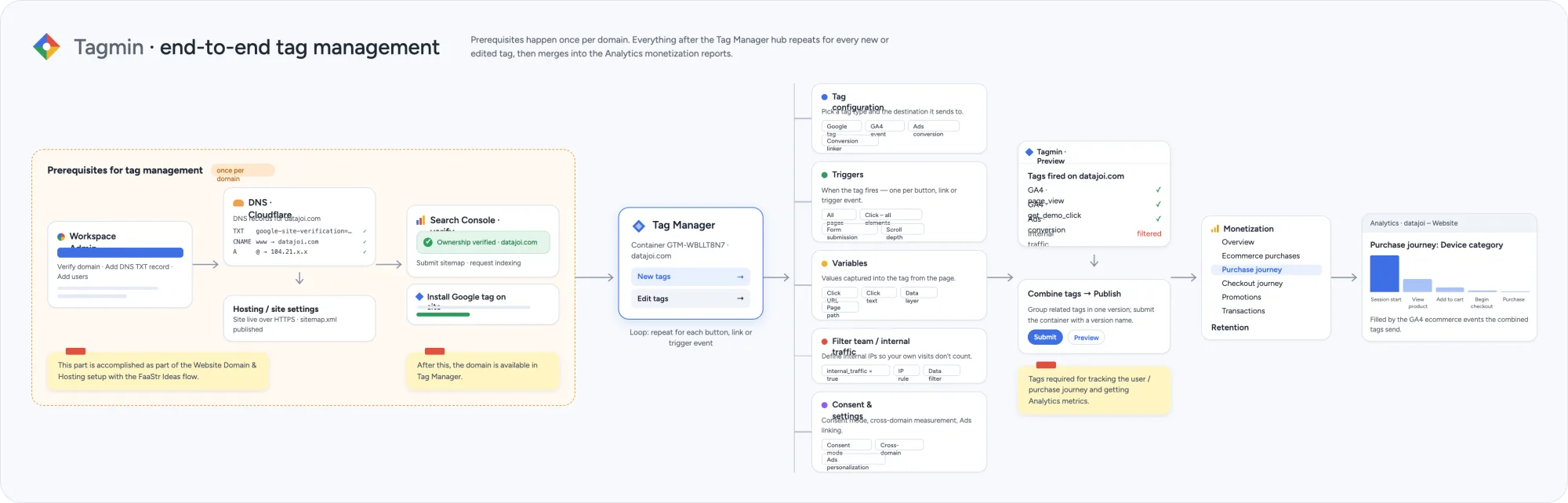
Tagmin end-to-end tag management. Prerequisites once per domain: Workspace admin, DNS records on Cloudflare, Search Console verification and installing the Google tag. Then the Tag Manager hub with tag configuration, triggers, variables, internal-traffic filter and consent settings, then preview and publish, then Analytics monetization reports.
01 · WORKSPACE

Workspace admin

Verify the domain, add the DNS TXT record and add your users.

02 · DNS & CONSOLE

DNS and Search Console

Records live on Cloudflare. Verify ownership, submit the sitemap, request indexing.

03 · GOOGLE TAG

Install the Google tag

Live over HTTPS with a sitemap. Tagmin checks whether the tag already measures conversions.

04 · TAG MANAGER HUB

The hub, on repeat

One container per domain. New tag, edit tag, preview, publish.

Prerequisites are handled during website domain and hosting setup in the FaaStr Ideas flow.

Tag Manager hub

One loop per button, link or trigger

Tagmin reads the container and walks each element through the same five decisions, so nothing is tagged by guesswork.
→Tag configuration. Google tag, GA4 event, Ads conversion or conversion linker.
→Triggers. Clicks, links, form submission, scroll depth.
→Variables. Click URL, click text, data layer, page path.
→Internal traffic filter. Your own visits never count.
→Consent and settings. Consent mode, cross-domain, Ads personalization.
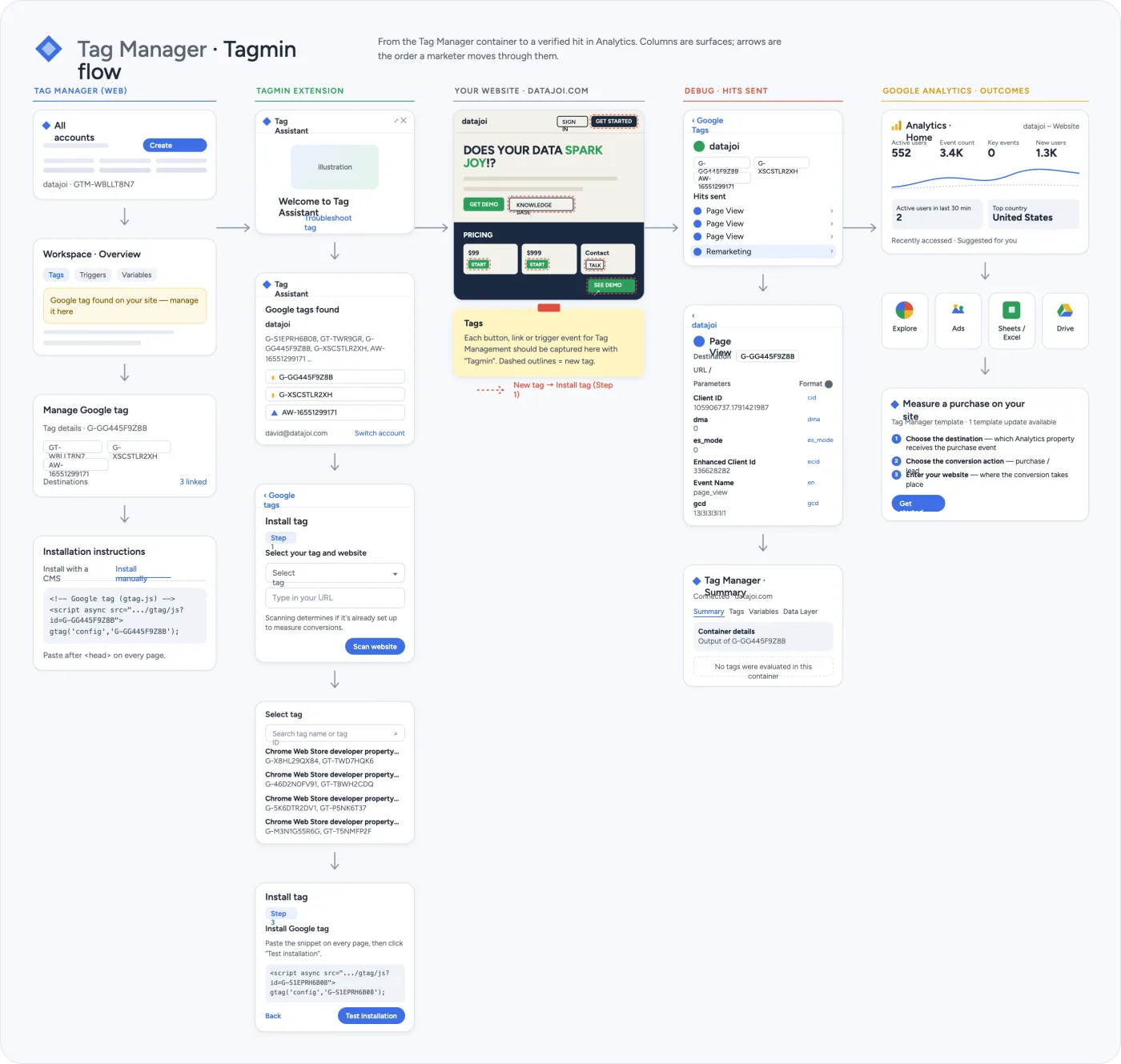
Tag Manager and Tagmin flow. From the Tag Manager container to a verified hit in Analytics: the container, workspace overview and installation instructions; the Tagmin extension listing Google tags and installing a tag; the website with new tags outlined; hits sent in debug; and Google Analytics outcomes including measuring a purchase.
From the Tag Manager container to a verified hit in Analytics.
New tag

Pick an element. Fill the form.

Click anything on the page and the panel pre-fills from it. You choose the tag type, trigger and destination; Tagmin captures the parameters.
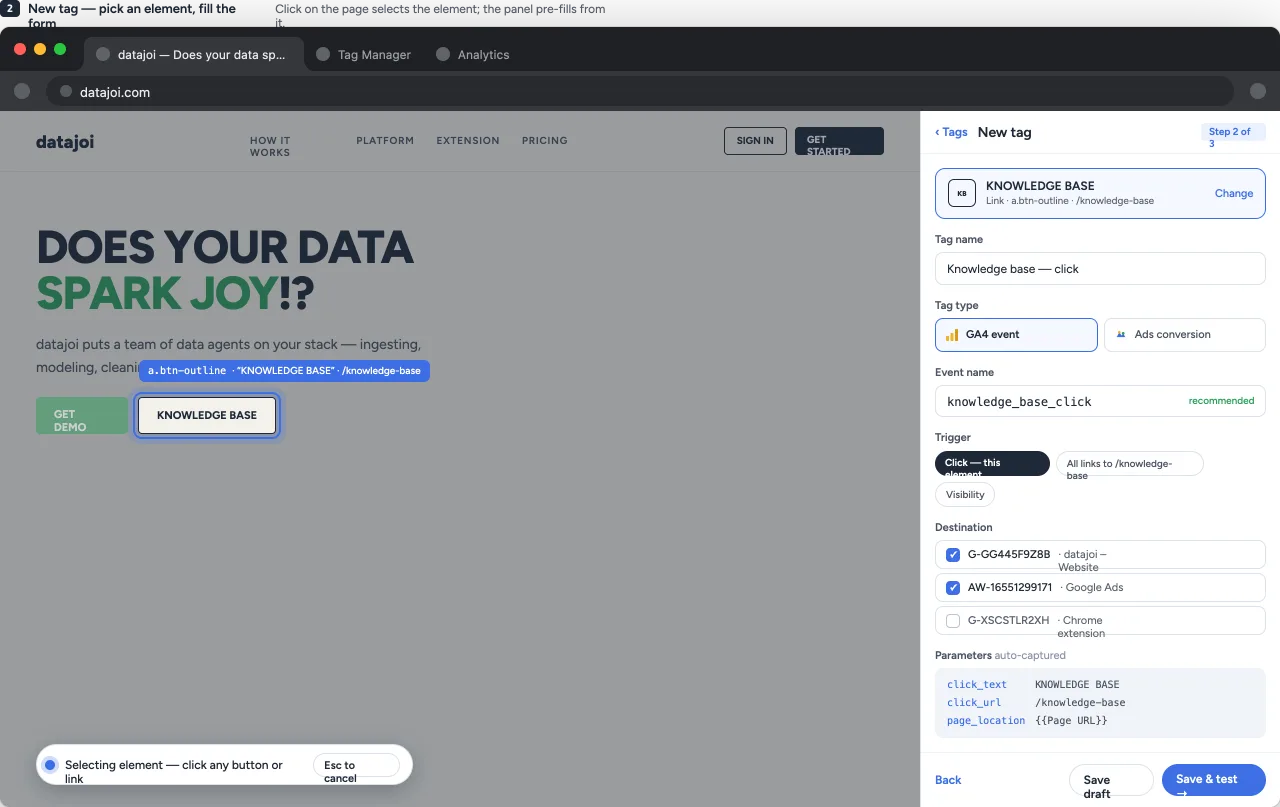
→Tag type. GA4 event or Ads conversion, with a recommended name.
→Trigger. This element, links to a path, or visibility.
→Destination. GA4 property, Ads account or both.
Tagmin new tag step 2 of 3. The Knowledge base link on the page is selected. The side panel shows the tag name, tag type GA4 event, recommended event name knowledge_base_click, a click trigger, GA4 and Google Ads destinations, and auto-captured click text, click URL and page location parameters.
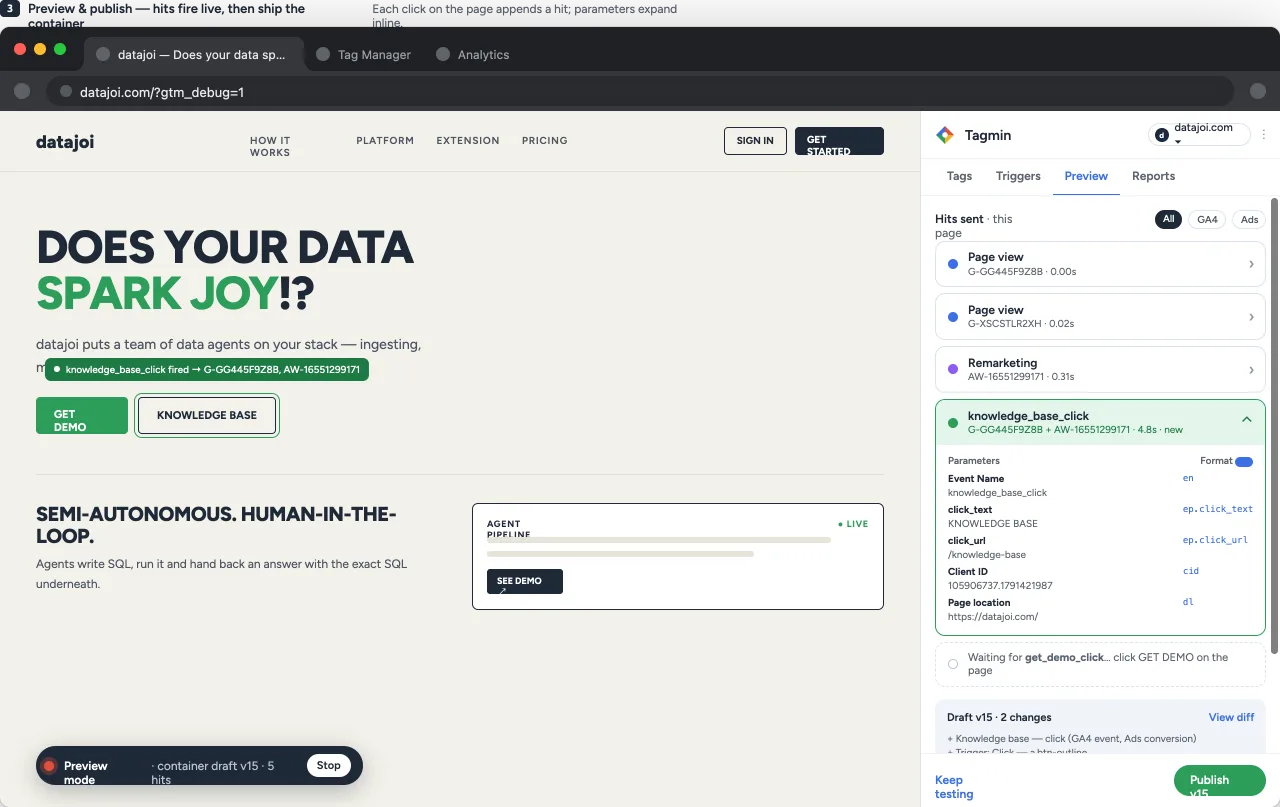
Tagmin preview and publish. Hits fire live as you click the page: page views for each property, a remarketing hit and the new knowledge_base_click event with its parameters. The draft container shows two changes with a view diff, and a Publish button.
Preview & publish

Hits fire live, then you ship the container

Each click on the page appends a hit with its parameters expanded inline. Tags needed for the user and purchase journey are checked before anything goes live.

→Tags fired. Every tag on the domain, and which are filtered as internal.
→Waiting for. The event Tagmin still needs, e.g. a click on Get demo.
→Combine and publish. Group, review the diff, name, submit.

From a hit to a monetization report.

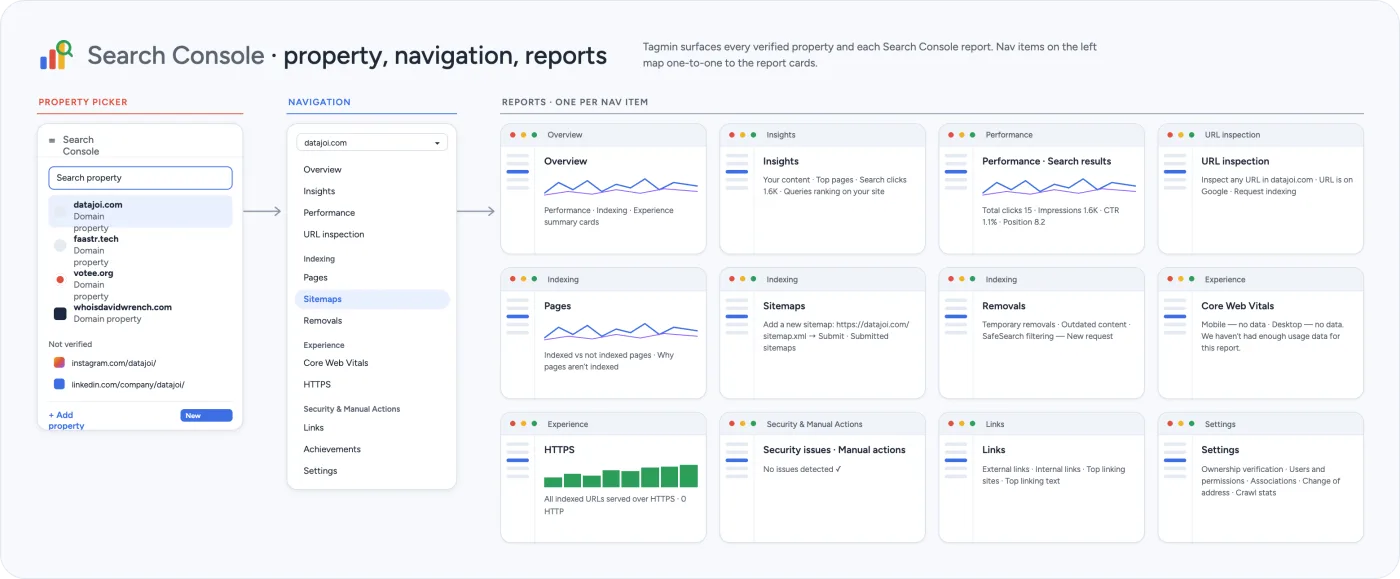
GA4 report groups and Search Console views, one per navigation item.
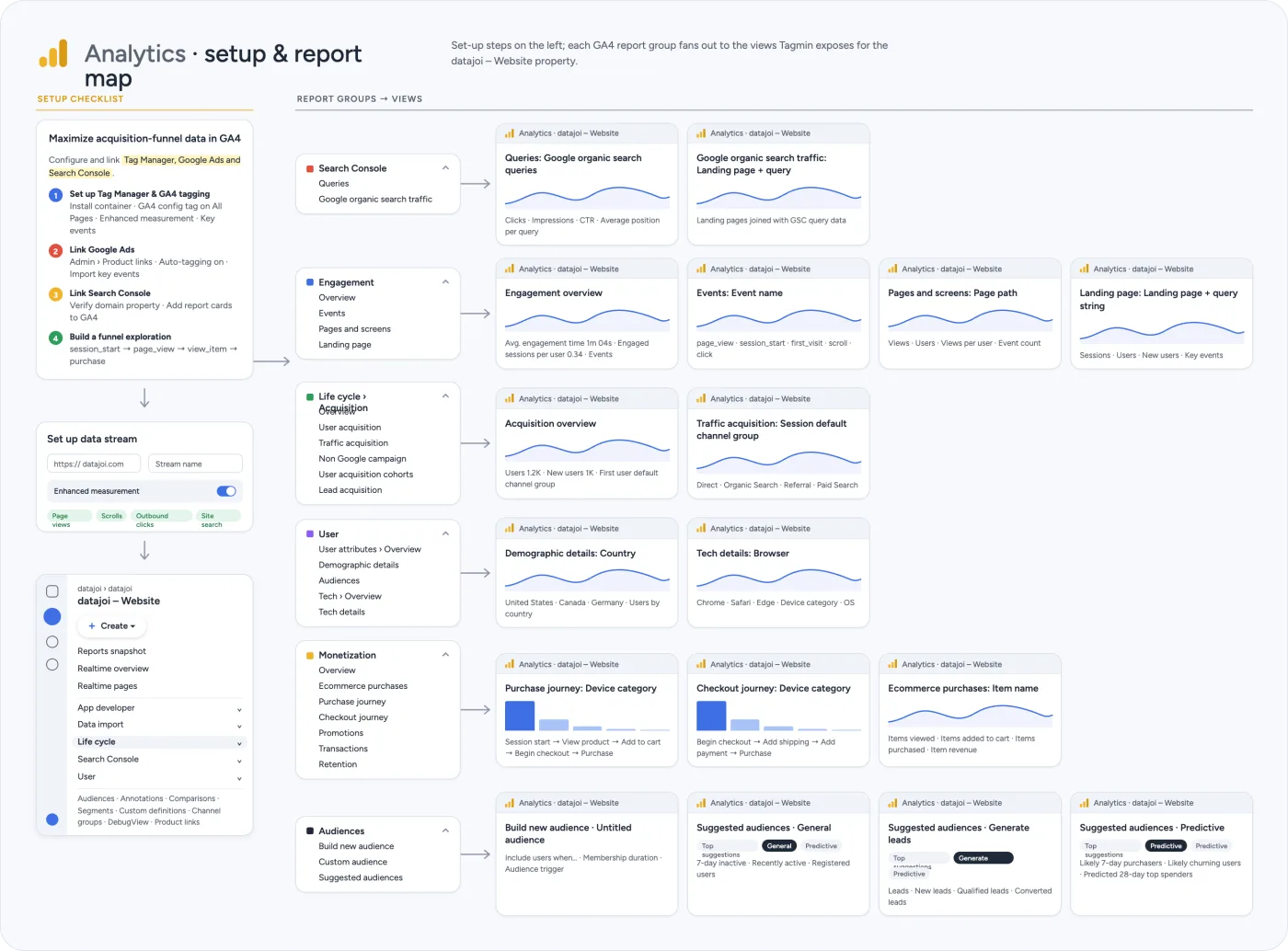
Analytics setup and report map. A setup checklist to maximize acquisition-funnel data: set up Tag Manager and GA4 tagging, link Google Ads, link Search Console, build a funnel exploration. Report groups fan out to views: Search Console, Engagement, Life cycle, User, Monetization and Audiences.
GA4 setup checklist and report groups.
Search Console property picker, navigation and reports. Every verified property is listed, and each navigation item maps one to one to a report card: overview, insights, performance, URL inspection, pages, sitemaps, removals, Core Web Vitals, HTTPS, security, links and settings.
Search Console property picker and one report per nav item.

Start with checks. Add automation when you're ready.

Tagmin is a by-product of the FaaStr Flow process, so FaaStr users get all of it, Pro included, free along the way. Other businesses can plug it into their own operations flow. Join the list and we'll tell you when it lands.

Free

Google Tag Assistant checks

$0
Coming soon
→Scan any page for buttons, links and triggers
→Tagged / untagged check with on-page markers
→Free for FaaStr users
Follow on Product Hunt
Automation

Pro

Tag Manager integrations · free for FaaStr users

$19 / month
Coming soon
→Everything in Free
→Create tags, triggers and variables in Tag Manager
→Live preview, diff review and one-click publish
→GA4 and Search Console reports
Follow on Product Hunt

Coming soon

Tagmin is coming soon.

Follow Tagmin on Product Hunt, try it on launch day, and tell us what to build next.